Webdings vs Wingdings: Understanding the Difference Between Microsoft's Symbol Fonts
Everything you need to know about Microsoft's icon fonts and which one to choose.
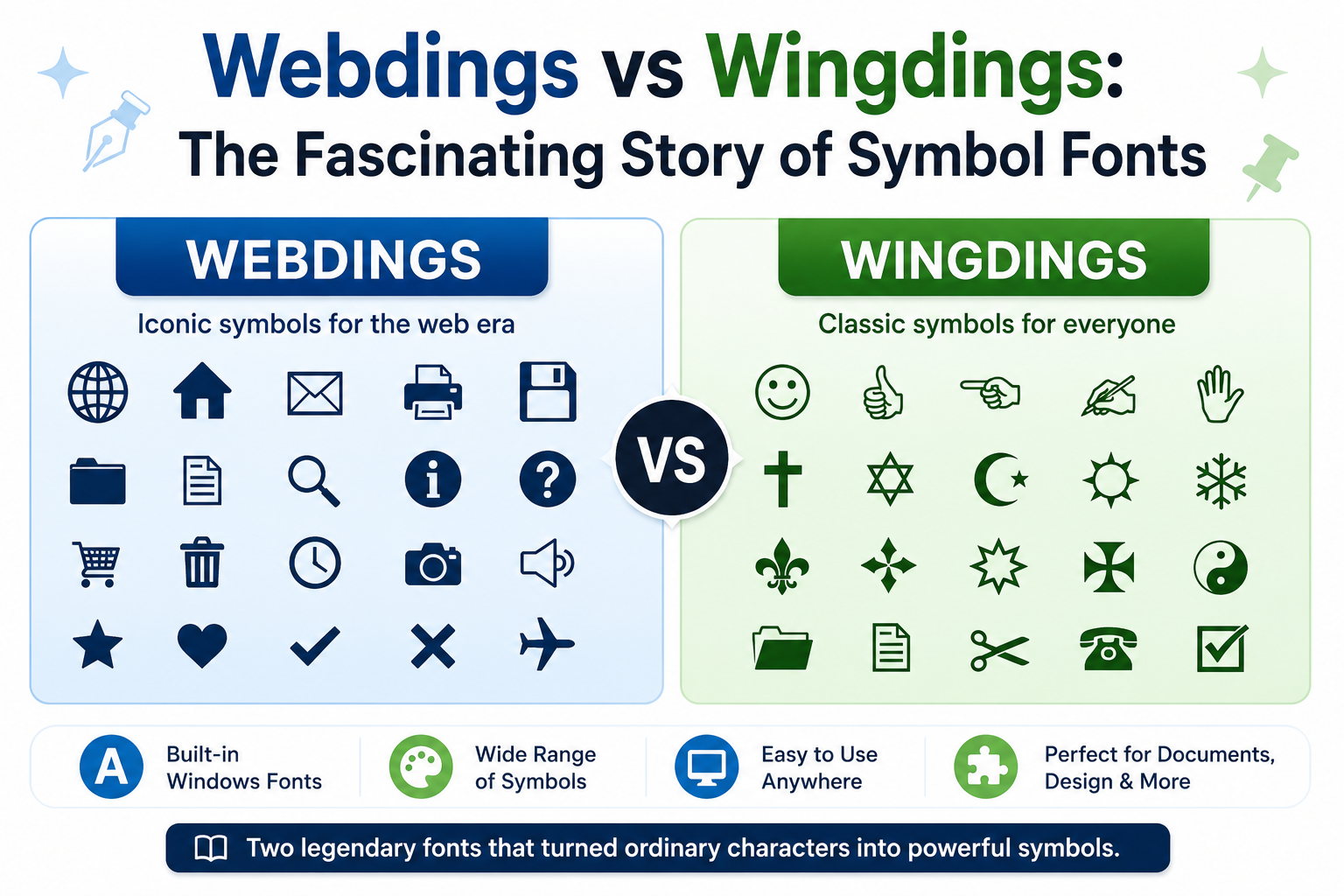
If you have ever looked through the font list in Microsoft Word, then chances are that you may have seen both Wingdings and Webdings. On the surface level, it looks like these are simply random fonts, but in reality, both these fonts were developed for a certain purpose in the early years of personal computers.
This article will help you understand everything about these fonts including their characteristics and history.
What Are Wingdings and Webdings?
Both Wingdings and Webdings are referred to as "dingbat fonts." Unlike regular fonts that show text characters and numbers, "dingbat fonts" show images and pictograms instead. They have become quite popular before emojis and symbols were widespread.
It means that rather than showing text, every keystroke produces an image. It was an easy way to insert an element graphically into a document without having to use any images.
The History of Wingdings
Wingdings is a font created by Microsoft back in 1990, and now is part of the Windows OS family of fonts. Wingdings uses a variety of symbol groups like arrows, stars, and user interface icons.
At that time in the early 1990s, PCs did not have many graphic abilities. It was much more effective to use a symbol font system rather than embedding individual images.
Some of the most common Wingdings symbols include:
- Check marks
- Arrows
- Hand pointers
- Geometric shapes
- Religious and zodiac symbols
- Smiley faces
Over time, Microsoft also released Wingdings 2 and Wingdings 3, expanding the collection with additional symbols and arrow variations.
The Story Behind Webdings
The font Webdings was released many years after Wingdings in 1997. Webdings is a special font which is meant for use in the internet age and it includes icons that represent themes related to the internet and technologies. Webdings font comes installed with Windows and Internet Explorer, thus it was very easily accessible to everyone.
Webdings includes more icons related to user interface designs, which include but are not limited to:
- Email icons
- Phone icons
- Folder icons
- Computer icons
- Navigational icons
- Weather icons
Wingdings vs Webdings: Key Differences
Although both fonts are symbol-based, they were designed with different use cases in mind.
| Feature | Wingdings | Webdings |
|---|---|---|
| Release Year | 1990 | 1997 |
| Primary Purpose | General symbols and decorative icons | Internet and interface-related icons |
| Common Symbols | Arrows, hands, checkmarks, stars | Folders, communication icons, web graphics |
| Creator Background | Based on symbol collections licensed by Microsoft | Created by Microsoft's typography team |
| Best Use | Documents, presentations, print materials | Web mockups and digital interfaces |
In simple terms, Wingdings focuses more on decorative and functional document symbols, while Webdings leans toward technology and communication-themed graphics.
Why Were These Fonts Important?
Nowadays, we are able to put emojis, SVG icons, and high-quality pictures into our texts almost immediately. Nevertheless, in the 1990s, adding graphics to our text was not an easy task.
Here comes the Wingdings and Webdings font that offered scalable icons that worked like regular text. You were able to change their size, color, and formatting, while not having to think about image quality and size.
These fonts became the first emoji pack for many people.
Are Wingdings and Webdings Still Relevant?
While modern icon libraries have largely replaced them, both fonts still remain useful in certain situations:
- Creating quick visual indicators in documents
- Building Excel dashboards
- Designing forms and checklists
- Educational demonstrations
- Retro and nostalgic design projects
Many of their symbols have also been incorporated into Unicode, making similar icons available across modern devices and applications.
Which Font Should You Choose?
🎯 Choose Wingdings if you need:
- Checkmarks and crosses
- Directional arrows
- Decorative shapes
- Hand gestures
- Traditional document symbols
🌐 Choose Webdings if you need:
- Communication icons
- Folder and file graphics
- Internet-related symbols
- User interface elements
- Technology-themed pictograms
Frequently Asked Questions
Yes! You can switch between fonts in any application that supports custom fonts. For example, in Microsoft Word, you can select text and change the font from Wingdings to Webdings or vice versa.
Wingdings has significantly more symbols when you combine all three versions (~750 total). Webdings has only one version with ~225 symbols. However, Webdings has more modern and web-oriented icons.
Both fonts are included with most Windows installations, but may not be available on macOS, Linux, or mobile devices by default. However, you can download and install them manually. Our download guide explains how.
Webdings is often better for social media because it has more recognizable icons that look like modern emojis. However, Wingdings is great for creating unique, eye-catching visual effects in posts.
Final Thoughts
Even though these two font families look like they belong to a bygone age in computing, they were crucial for bringing images into documents and other forms of digital content. Before emoji became widespread and before people could easily use icons in their messages, these fonts offered users a simple means of expressing themselves visually.
If you are revisiting some old Microsoft fonts or just reminiscing about the good old days, Wingdings and Webdings make for an interesting topic.